Observability first
Know what your network is doing.
Hear about it when it changes.
Every question is counted, timed, explained, and searchable. When something needs attention, TelltaleDNS tells you where you already look: your inbox, your phone, or your team's channel.
Watch
Everything a question went through
Dashboard
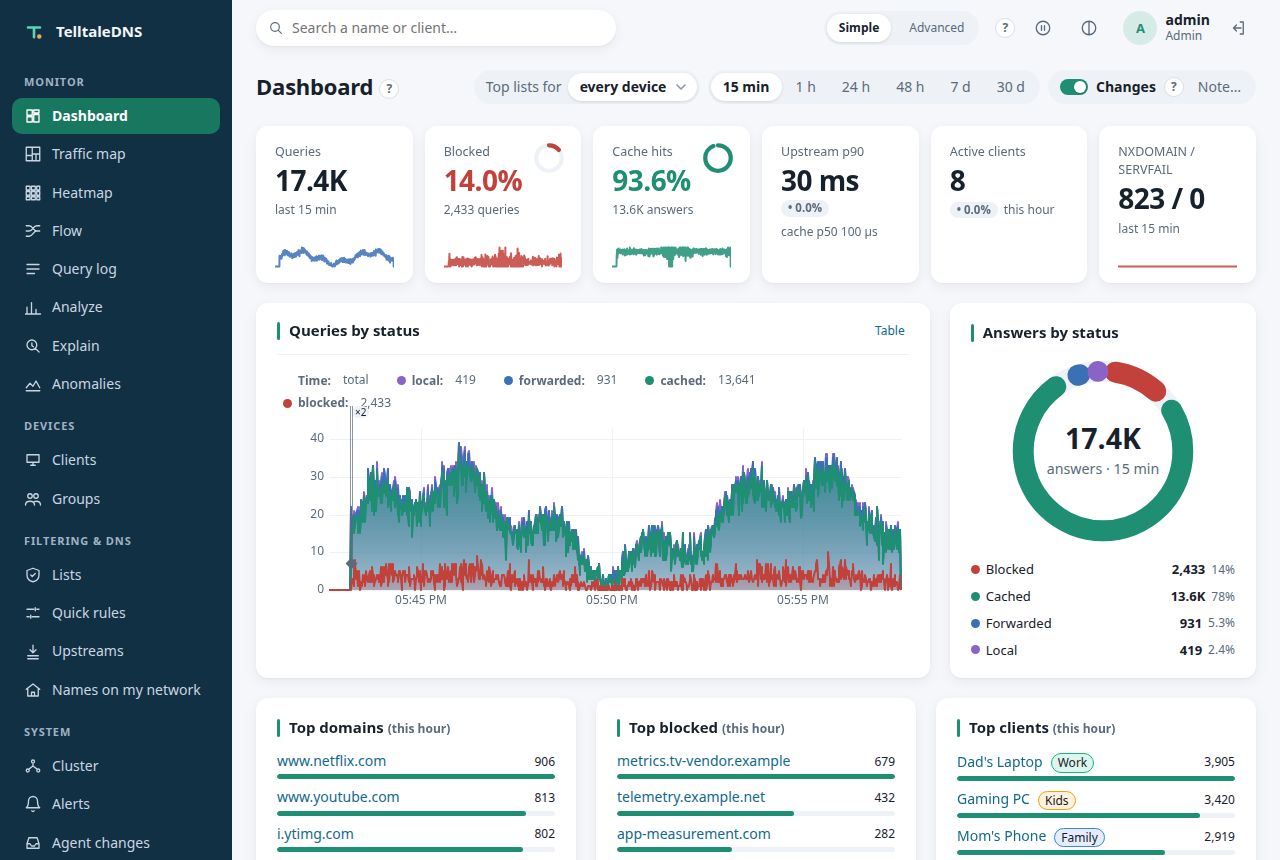
Queries, blocked share, cache hits, NXDOMAIN, active devices, and latency percentiles, per minute for a week and per hour for over a year, by status, type, response code, and group.
Query log
Every question with its device, group, answer, and timings, in a compact columnar log built for search: filter by name, device, status, type, or latency, and see Why? on any row (the list and line that decided it).
What changed, on every chart
Thin lines on the time charts mark each configuration change (and whether it came from the web UI, the API, an AI agent, or Git, and who), new builds, restarts, list refreshes that changed the rules, rollouts, maintenance, pauses, cache flushes, and upstreams failing over. Hover one for what and who. Add your own note for what the network can't see, like a new access point or an ISP outage; Grafana draws the same changes from Prometheus.
When it happens
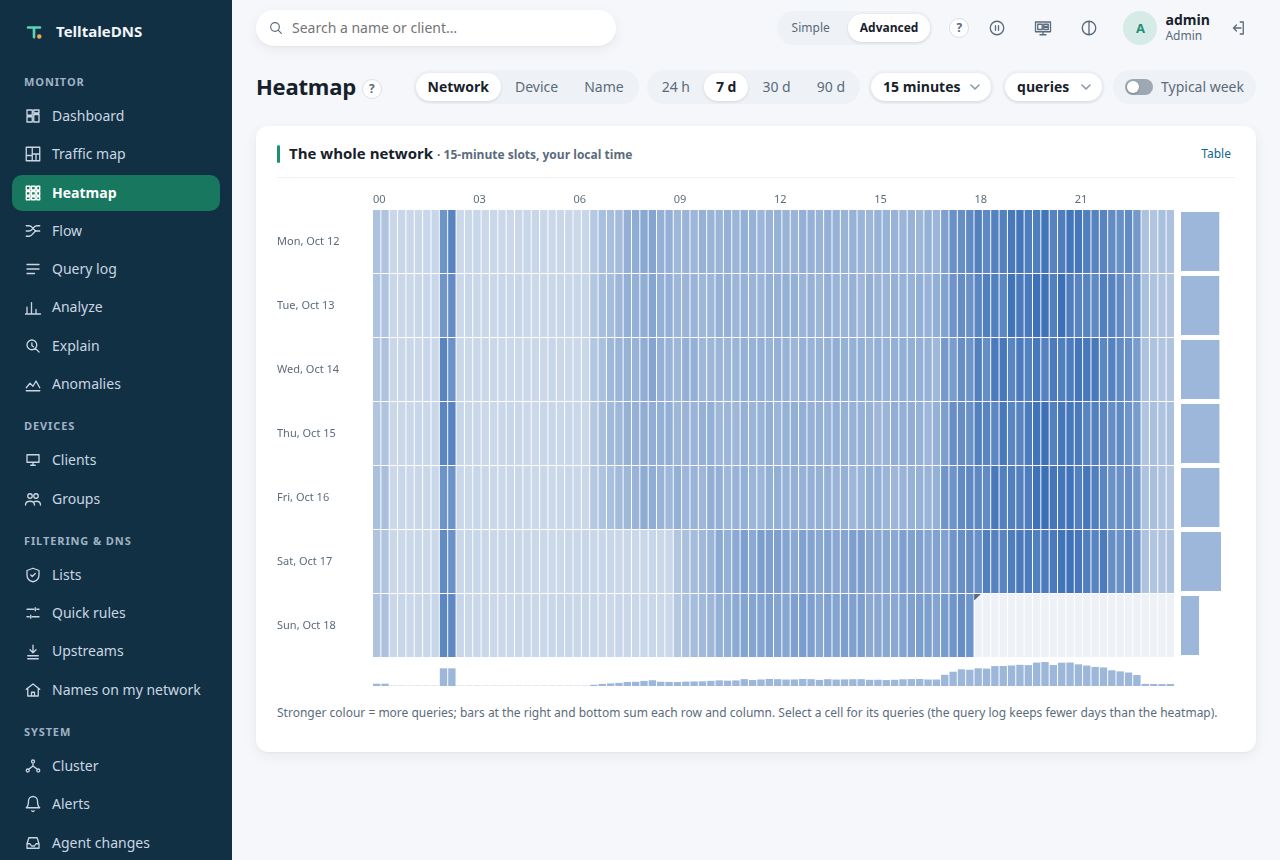
A heatmap of days by time of day, for the whole network, one device, or one name: a morning burst, a device that never sleeps, or a tablet's bedtime shows at a glance, with a typical-week view.
Traffic map
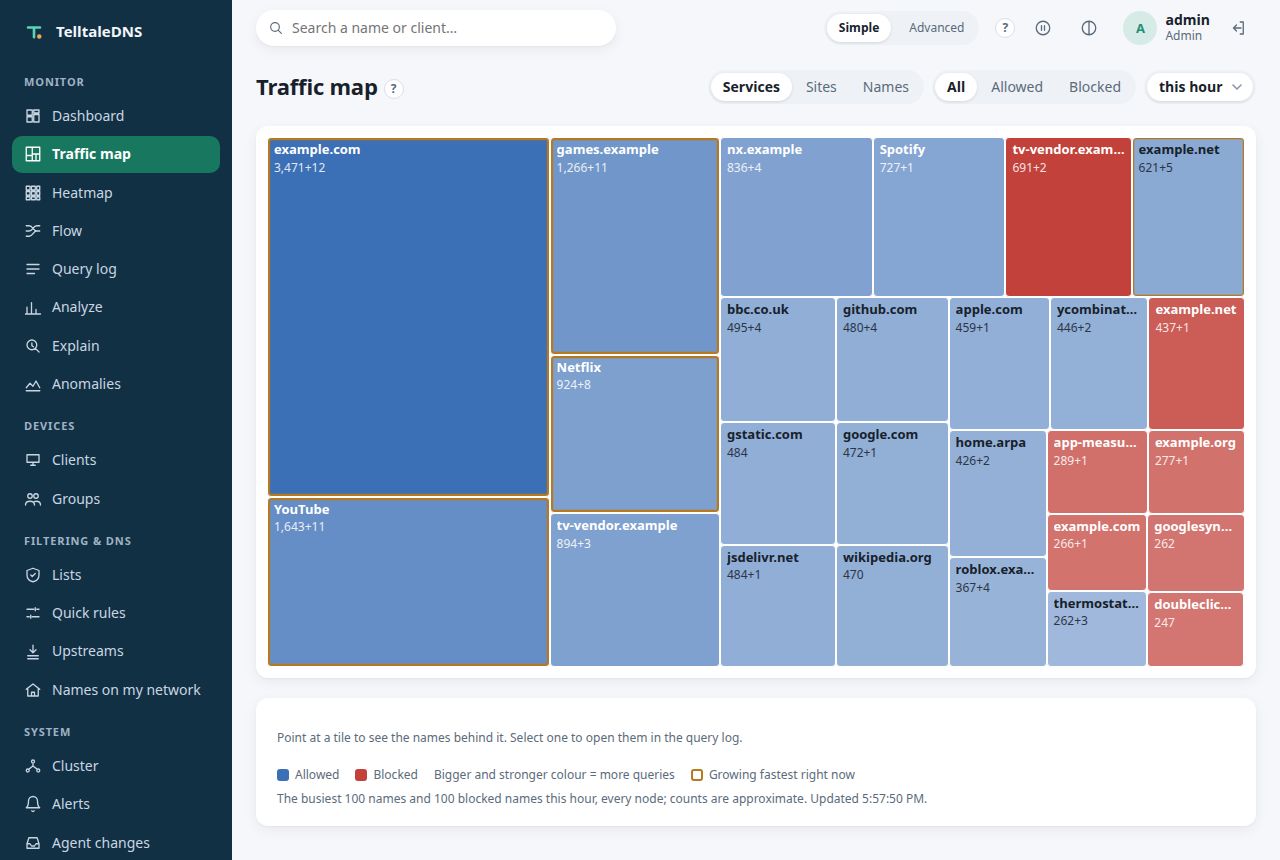
What the network is reaching, in one picture: a tile per service, site, or name, sized by how often it was looked up this hour, blue for answered and red for blocked. It refreshes every few seconds and marks what's growing fastest, so it works on a wall screen.
Live view
Questions as they happen, filtered on the server and rate-capped, across every node of a cluster, each row naming the node that answered.
On the wall
A full-screen page for a monitor or a tablet: the traffic map growing, dots flowing along the query flow, the service level as rings, the answer-time heatmap, and the live queries ticking by, one panel at a time. No new data, no menu, and nothing moves if you'd rather it didn't.
Is that node odd?
Every node side by side over the same window: SERVFAIL, slow and from-cache shares, upstream failures, p50 and p99, each with a sparkline. A node that really deviates is outlined with when it started; one that only has the same failures on a tenth of the traffic gets a note instead of the blame.
Where queries go
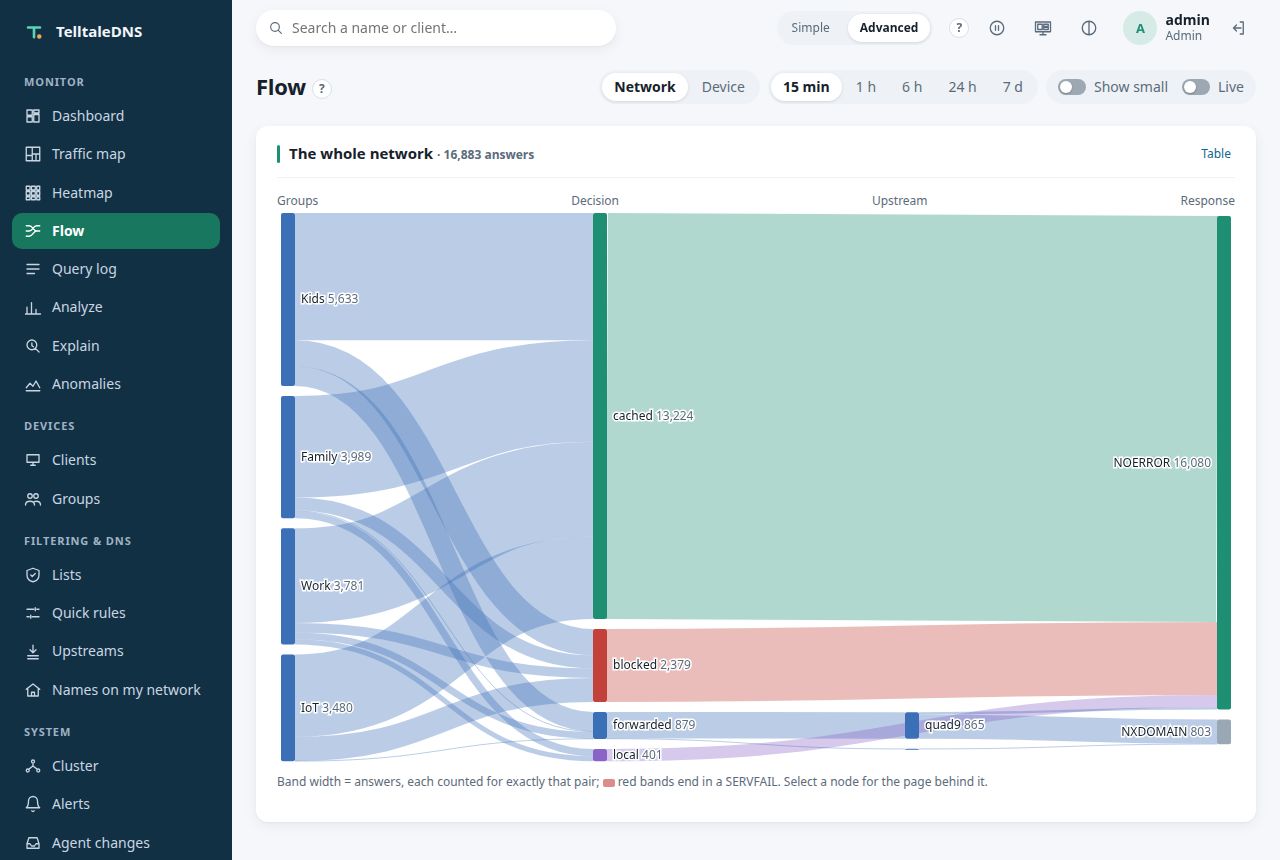
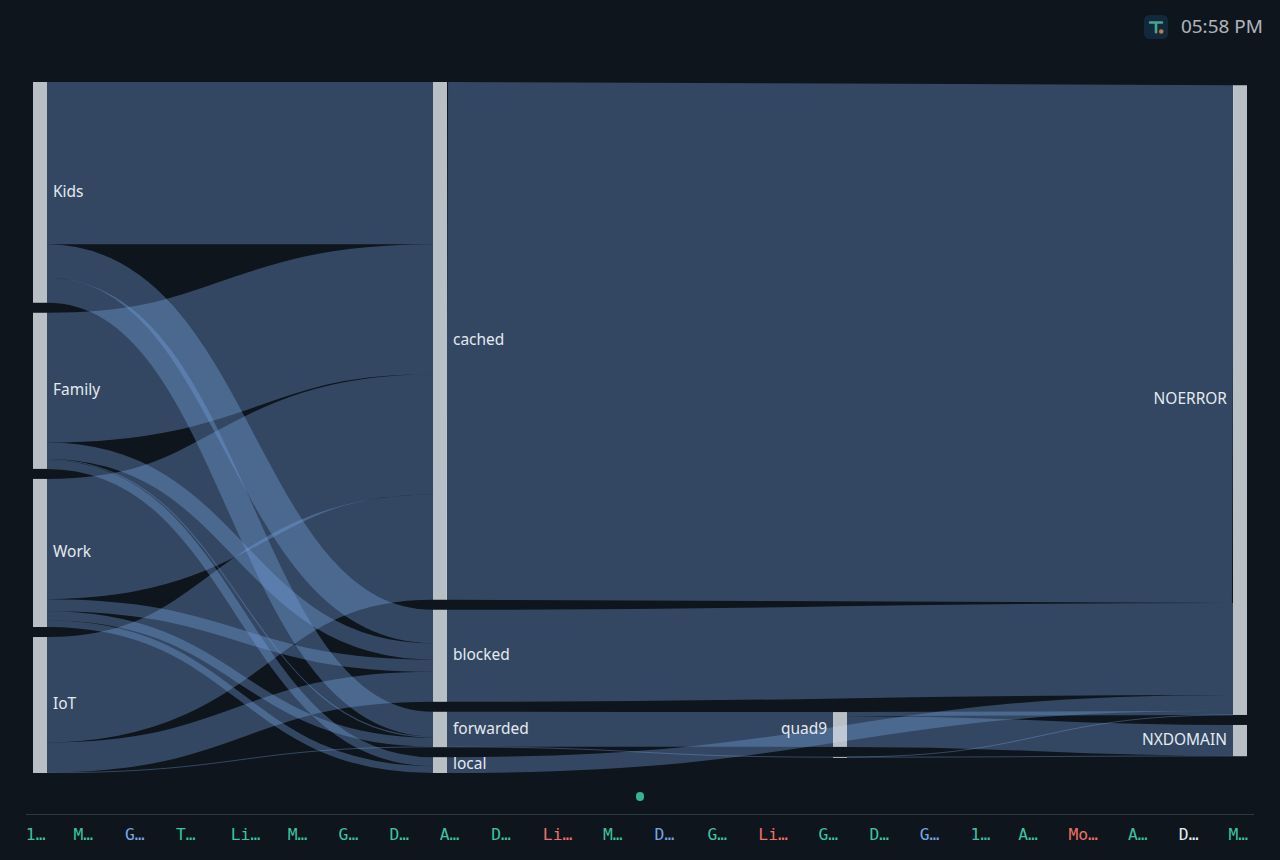
One diagram from groups through the decision and the upstream to the response code, each band as wide as its answers and counted for exactly that pair. Red bands end in a SERVFAIL; select a node for the page behind it. For the network, or one device from the query log.
Latency, honestly
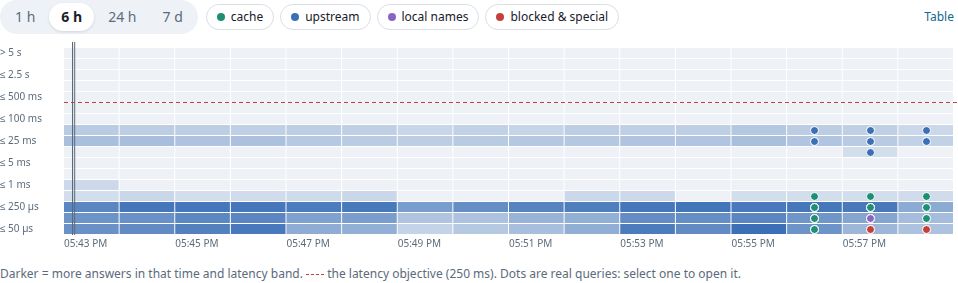
Percentiles per answer path, query type, upstream, and device. In a cluster they're computed from every node's merged histograms, so a slow node shows up in the p99 instead of being averaged away. A latency heatmap draws the whole shape over time, with real queries as dots you can open.
Analytics in one line
from -7d | where group = kids and status = blocked | top 10 domain: vqlog answers questions no dashboard has a tile for, with its cost shown up front.
Try a list before it blocks
Put a list in shadow mode and see what it would have blocked on your network (names, devices, how often) before turning it on. Names that devices kept retrying, or that someone unblocked right after a block, show up as likely over-blocking.
What would this have done?
Before you save a change (a quick rule, a list, a device moved to another group, a new upstream), replay yesterday's queries with it: you see what would have been newly blocked, newly allowed, sent elsewhere, or answered differently, by name and device, with the rule that decided. Only the changed lists are compiled, and DNS never waits for it.
A second opinion
Per upstream: DNSSEC verdicts, and the error codes it attaches (Blocked, Censored, Filtered mean it filters). Optionally, a small sample of questions is asked again of another upstream and the answers compared, so an upstream that quietly filters or rewrites shows up, with both answers side by side.
Asked like a device would
Every node asks each of its listeners a question over UDP, TCP, DoT, DoH, or DoQ every 30 seconds, plus any address you add (a load balancer in front), and watches each certificate's expiry. A listener that stops answering, or a certificate about to lapse, shows on the health icon and can alert.
Only what matters
Keep connectivity checks, time servers, or a monitoring probe out of the log and the statistics, with one switch in Settings or in your Git configuration. They're still answered and still counted in Prometheus. A list whose content stopped changing for a month is flagged as stale, before it quietly falls behind.
From a spike to the query
Every latency bucket on /metrics carries an exemplar, a recent query that landed in it. Click its dot in Grafana and the trace ID opens that query in the log. Sampled and slow queries can go to your tracing backend as OpenTelemetry traces, with the same ID.
Is the cache big enough?
Each node estimates what a cache 25%, 50%, or 100% larger would have answered from memory, from a small sample of names asked again after they were evicted, and says whether to grow it, shrink it, or leave it.
Your pods, by name
In Kubernetes, each pod's queries are named by the workload that runs it (media/deploy/jellyfin), one device across rollouts, grouped by namespace label. See what it looks like.
The machine too
Memory, CPU, disk, and temperature for every node, with the last hour of history and warnings, on the Cluster page and in metrics.
Health at a glance
One icon in the menu for the whole cluster: healthy, degraded (an upstream or node down, a device rate-limited, a list failing), or severe (no upstream in a group answering, DNS not served). Click it for the reasons and where to look; the same answer is in the API and for AI agents.
A month in one number
Service-level objectives for answers that work (not SERVFAIL) and answers that are quick (within 250 ms by default), each with an error budget for the month. The dashboard shows how much is left and how fast it's going; a fast burn turns the health icon amber and can alert, while a single failed lookup on a quiet night doesn't. Prometheus gets the same rules. Who spent it? shows the devices, names, upstreams, and nodes behind every failed or slow answer of the window.
Notice
Device anomalies
Each device is compared with its own usual behavior, learned over its first week. Findings come with their evidence (what was seen, the usual value, the bar it crossed) and never block anything on their own. In a cluster you see every node's findings in one list; acknowledge one once you've looked, and it stops counting as new on every node.
Rate spikes and drift
Many more questions than usual for this hour, or many new domains in a day.
Beaconing
Regular call-home patterns: the same domain at a steady interval, the signature of telemetry and malware alike.
A device's day
One device as swimlanes, a lane per domain it talks to, with its answer time below and what happened above: first contacts, anomalies, blocked bursts, changes. When did that loop start, and what else did the device do?
Every device's rhythm
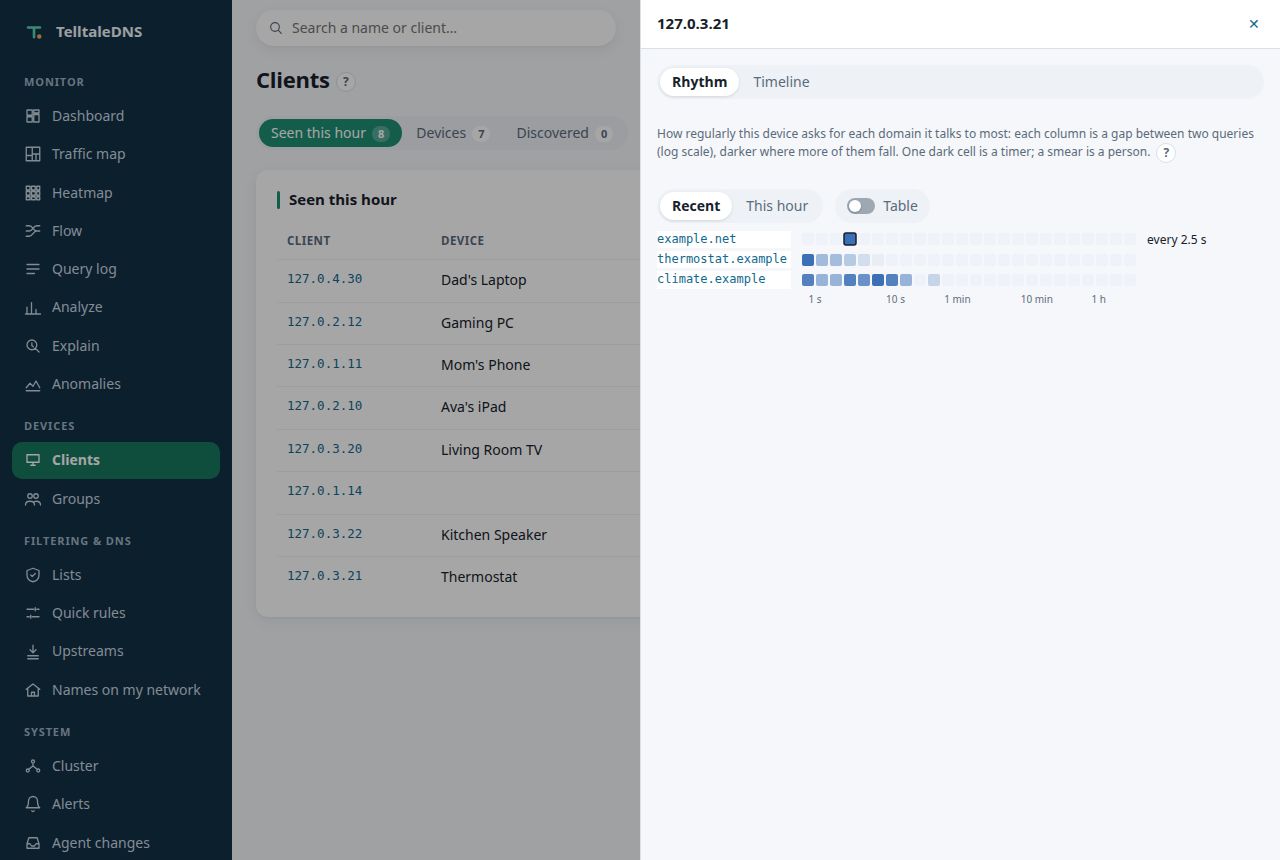
For each domain a device talks to most, how its queries are spaced, from under a second to two hours: a time-sync loop every 2.5 s is one dark cell, a person browsing is a smear. Seen, not judged: only a new steady rhythm becomes a finding.
NXDOMAIN storms
Bursts of failed lookups from one device: a broken app, or something hunting for a server.
New and generated-looking domains
Each device's first-seen domains, scored for how machine-generated the name looks (DGA).
Tell
Alerts, where you'll see them
Rules watch the whole cluster from its primary, so you get one message, not one per node. A condition must hold for a while before it alerts, and a "Resolved" follows when it clears.
upstream_down | an upstream stops answering (its circuit breaker opens) |
|---|---|
node_down, sync_lag | a cluster node drops out, or falls behind the configuration |
list_failing | a blocklist stops updating |
servfail_rate | failures climb above a share of queries |
slo_burn | an objective spends its monthly error budget too fast |
probe_failing, cert_expiring | a listener stops answering its own check, or its certificate is about to expire |
anomaly, new_device | a device behaves oddly, or a device appears for the first time |
disk_full | a node's data disk fills up |
plan_pending | an AI agent's change waits for your approval |
update_available | a newer TelltaleDNS build is out |
maintenance | a node goes into maintenance, and when it's back |
rollout_failed, cluster_pinned | a staged rollout failed on its canary nodes and the cluster went back to the version before; the cluster stays pinned to an older version |
A node in maintenance (planned work: a Pi's SD card, a move, an upgrade) is left out of the other rules and the health icon until its window ends, so a planned stop never pages you. It keeps answering whatever still reaches it.
Destinations: email (any provider's SMTP: Gmail with an app password works, no mail server of your own), ntfy and Gotify push to your phone, Slack-compatible channels (Slack, Mattermost, Discord), or any webhook.
[[alerts.destination]]
name = "inbox"
type = "email"
url = "smtp://smtp.gmail.com:587"
from = "you@gmail.com"
to = ["you@gmail.com"]
username = "you@gmail.com"
password_file = "/run/secrets/smtp"

[[alerts.rule]]
name = "Upstream down"
when = "upstream_down"
for_secs = 60
to = ["inbox"]
Email is always encrypted when a password is sent (STARTTLS or TLS, no fallback). Secrets stay in files, out of the configuration and Git.
Export
Into the tools you already run
Prometheus and Grafana
A /metrics endpoint with query, cache, upstream, filter, cluster, and host series, and a ready-made Grafana dashboard: service level, traffic by transport, latency, upstreams, filtering, cache, and the node itself (uptime, restarts after a crash or an OOM kill, CPU, temperature, disk), with configuration changes, list refreshes, and restarts marked on every panel. The Helm chart can add a ServiceMonitor, and alert and SLO burn-rate rules.
OpenTelemetry
Metrics, query events, and sampled or slow queries as traces, over OTLP/HTTP to a collector or any OTLP backend.
Event sinks
Every query as a JSON line to a file, to syslog (RFC 5424, UDP or TCP), or batched to a webhook, with the same fields as the query log.
dnstap
Raw query and response messages in the standard dnstap format, for DNS-specific tooling.
None of this sits on the query path: exports run in their own tasks with bounded buffers, and a slow collector loses events (logged) rather than slowing DNS down.